ラベル xcode の投稿を表示しています。 すべての投稿を表示

2020年3月27日金曜日

ios app, internationalization ,i18n

How to prepare i18n for my ios app.

1. add languages to translate
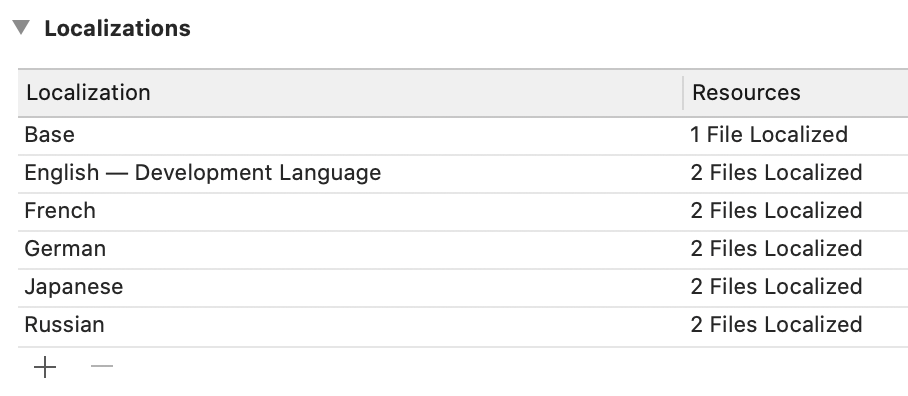
go to project setting and tap info
find Localizations, press + and add any languages 

2. add string file 
This is the list of strings that should be translated in 

File menu and choose New > File, then select Strings File from the list of file types 

2020年2月23日日曜日

xcrum simctl push, send apn payload to ios simulator

Xcrun is the command line tool of Xcode and it's simctl push can test push notification on ios Simulator with xcode 11.4 ( it is still beta as of 23.02.2020)

$xcrun simctl push --help

to get device information and it's identifier run the below command. in general it is easier to using "booted" as targeting device though. however if more than two simulators are running device identifier should be clearly specified.

$xcrun simctl list devices | grep Booted

$xcrun simctl push booted com.example.app payload.json


2020年2月7日金曜日

How to read the log from iOS devices.

Assuming running Xcode


  1.  Go Windows and Devices and then Simulators.
  2.  Choose the  device from the devices section on the left side screen.
  3.  Click Open Console

2020年1月31日金曜日

ios 13, how to change the text field placeholder color from storyboard

How to change  text field placeholder color from storyboard .


  1.  select the UITextfiled of which you want to change the color. if there are several text fields, you have to do the same procedure for each.
  2. open the identity inspector. see the pic.
  3. Find the User Defined Runtime Attributes  and click + button.
  4. Type a new row with Key Path  placeholderLabel.textColor. be reminded that this is for iOS13, Swift 5.0. if it is for lower version, type _placeholderLabel.textColor instead.
  5. choose Type color and select the color as your choice.

2020年1月22日水曜日

Xcode. device is not connected.

When Xcode said  your device was not connected but actually it was connected.
it would be solved reboot however avoiding reboot, type the below command.


sudo launchctl stop com.apple.usbmuxd
stackexchange

What is launchd

according to wikipedia,
launchd is an init and operating system service management daemon created by Apple Inc. as part of macOS to replace its BSD-style init and SystemStarter. There have been efforts to port launchd to FreeBSD and derived systems.

it could solve other problems too..